Thursday, May 19, 2011

RecognizeMe Unlocks Your iPhone Using Your Face (Jailbreak)


That's why I own a jailbroken iPhone. RecognizeMe is a new Cydia tweak which lets use front-facing in iPhone 4 or iPad 2 to unlock your iPhone. Yes, it's really working. The tweak comes from developer Apocolipse behind the popular tweak 3DBoard. The tweak has been submitted already to Cydia store and will be available in few days.

RecognizeMe is the first Facial Recognition security for the iPhone. Although not perfect, RecognizeMe does a pretty good job at facial recognition, given optimal conditions. RecognizeMe sits on the iPhone passcode screen, so it serves as an alternate to, rather than a replacement for the passcode.
RecognizeMe uses 2 2 different algorithms to verify, one is good for accessing 3d biometrics, the other is good at weeding out? false positives based on feature analysis. This tweak'll be available for $6.99.

Here's a video showing it in action:


Wednesday, May 18, 2011

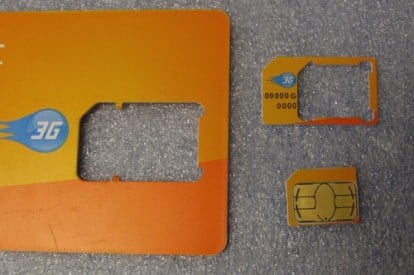
Apple Proposes Standard for Smaller SIM Cards to Make Even Thinner iPhones

As reported by MacRumors , Apple would have proposed a new standard of the ETSI SIM for mobile phones even smaller than the current micro-SIM on the iPhone and iPad 4. To confirm this news would have been a director of Orange during some statements to Reuters .
The news comes directly from the words of a director of Orange (known foreign telephone company), which stated that the company is “happy” about the proposal made by Apple against the ETSI, the European Institute for Telecommunications Standards ( English European Telecommunications Standards Institute).
This proposal is just adopting a new standard for mobile phone SIM card: the card that Apple would want to introduce even smaller than the current micro-Sim is commonly found in our iPhone and iPad 4.
The same source, would also be other companies who support Apple in this choice.Obviously, for now there is no news regarding a possible market entry of this new standard but, according to some, we could see the first phones equipped with this technology as early as 2012.
This news comes rather unexpected, especially considering rumors appeared a few months ago and they wanted Apple committed to developing a kind of phones with integrated SIM. While many players were excited about this project, many others had expressed views to the contrary, for obvious commercial reasons and business.
In addition, many note that the use of a SIM even smaller would further reduce the size (and thickness) of the devices. So we’ll see if the ETSI approve this proposal and whether, really, in the future, our phones will have this particular SIM.

Monday, March 28, 2011

Sn0wbreeze 2.4b1 Released to Jailbreak iOS 4.3.1

H8sn0w has just released Sn0wbreeeze 2.4b1 to jailbreak iOS 4.3.1 on iPhone 4, 3GS, iPod touch 4G, 3G and iPad. Sn0wbreeze 2.4b1 is also tethered jailbreak for all devices which means you will have to boot into jailbroken state evey time you reboot your device.


You have to know that Sn0wbreeze 2.4b1 supports ultrasn0w unlock for basebands (01.59.00 / 04.26.08 / 05.11.07 / 05.12.01 / 05.13.04 / 06.15.00) ONLY.

Download Sn0wbreeze 2.4 for Windows.

Saturday, March 26, 2011

Unlockers and iPad 2 Jailbreakers Stay Away from iOS 4.3.1

MuscleNerd has just tweet a warning for unlocker just after releasing iOS 4.3.1 , he asks who rely on ultrasn0w unlock to stay away from iOS 4.3.1. Obviously for most users this is common sense, but I'm pretty sure that many people will press the update button.

Unlockers please stay away from today's iOS 4.3.1! Just to be extra safe, so should future iPad2 jailbreakers (for now)
You can note that MuscleNerd also warn iPad 2 jailbreakers to stay away from updating to iOS 4.3.1 just to be extra safe at least for now.

iOS 4.3.1 available for download (direct links)

Apple has just released iOS 4.3.1 for iPhone, iPod and iPad, the new iOS version fixes a number of bugs found on iOS 4.3, you also have to know that iOS 4.3.1 is not available for Verizon iPhone.


 Here's the direct download links:

Thursday, March 24, 2011

iPhone 5 All Rumors [INFOGRAPHIC]

he guys over NoWhereelse else have prepared an amazing infographic which illustrates all the rumors around the upcoming iPhone 5.


Anyway, we will hear more and more speculations about iPhone 5 until its will officially release on the WWCD 2011 on June. Stay Tuned

Fix Mobile Substrate in Cydia After iOS 4.3 Jailbreak

Once a user jailbreaks the iOS 4.3, he manages to force the ASLR (Address Space Layout Randomization) feature which was implemented in the new iOS 4.3, to break the Mobile Substrate in Cydia, which is needed by many other tweaks and add-ons available in Cydia.

It is because of this update, that you will now be able to install and use all of the jailbroken apps and tweaks on the iOS 4.3 without any error or bug.


What You Need:
1.     Jailbroken iOS device on iOS 4.3
2.     Basic knowledge of jailbreaking


Instructions:
Now, the very first step is to open up Cydia from your “Homescreen” and go to the Search tab from Cydia, and search for “Safari Download Manager” and “iFile” for your respective iOS device and install both these apps


Now once you have downloaded both the apps, navigate to the below given link from your iOS device Safari browser
The Mobile Safari browser will prompt you if you want to download the file or not, click on the “Download” button and download the following file directory
  • .deb file to: /var/mobile

Now, go and start the “iFile” application and navigate to the place where you downloaded the above file directory. Tap on the Mobile Substrate.deb file and tap on the “Install” button to start the installation process
Once done, just give your iOS device a reboot to make sure things progress successfully. Now, once the reboot is complete, start Cydia again and search for “Mobile Substrate” and you should have the latest version for the iOS 4.3

iOS 4.3.1 Leaked !

Here's another proof from BGR, they have leaked a screenshots of the upcoming iOS 4.3.1 which has been tested by someone inside Apple. According to the source, iOS 4.3.1 will simply fix bugs and battery life improvement. You can check out the changes from iOS 4.3 after the jump.


  • Baseband updates for the 3GS and iPad (original)
  • Fixed memory hang that results in memory corruption when reading large files from USIM filesystem
  • Fixed problem with NTLM authentication in apps and on websites
  • Fixed issue with the Springboard and 3rd party apps not recognizing the gyroscope on the iPad 2
  • Fixed iPad 2 jailbreak vulnerability

The source also still confirming that Apple will release iOS 4.3.1 between one to two weeks, stay tuned.

Tuesday, March 22, 2011

Fix iPhone 4 iOS 4.3 Battery Drainage / Short Life Time [How to]

As mos of you know the problem which faced some problems with battery life after upgrading to iOS 4.3, our reader has sent a new method to stop the battery drain.


First method to stop iOS 4.3 Battery life problem:

Battery life should be restored to what they were before the latest update. Precisely, it's the notification system in Ping.

Go to Settings > General > Restrictions and select Enable Restrictions. You will see Ping setting whereby you can click on the switch to disable it. This will save 2 hours for your iOS device


Second method to stop iOS 4.3 Battery life problem (use if the first method didn't solve your problem):
Go to Setting > General > Reset > Reset Network Settings.

DreamBoard – An Alternative To WinterBoard For Jailbreak Themers

WinterBoard has been the skinning app of choice for many-a-jailbreaker for a good long while now, and it’s done a sterling job. Now though, it’s perhaps time for a challenger to try to break the equilibrium. That challenger is DreamBoard.


Now before you all read that opening paragraph and go delete WinterBoard, allow me to explain. DreamBoard is actually a little different to WinterBoard. The new DreamBoard is more of a way to apply themes to an iDevice rather than the more granular (if you want it) option of WinterBoard.
DreamBoard’s real party-piece is the ability to make an iOS device look more like Android. Out go the rows of icons and in come the widgets.

iOS 4.3.1 to Release within Two Weeks

According to BGR -who has a good track record regarding Apple rumors- that Apple is about to release iOS 4.3.1 within one to two weeks. Let's check out the expected updates on iOS 4.3.1.

  • Baseband updates for the 3GS and iPad (original)
  • Fixed memory hang that results in memory corruption when reading large files from USIM filesystem
  • Fixed problem with NTLM authentication in apps and on websites
  • Fixed issue with the Springboard and 3rd party apps not recognizing the gyroscope on the iPad 2
  • Fixed iPad 2 jailbreak vulnerability
Now, I think Stefan Essar -the guy behind the iPad 2 upcoming jailbreak- shall modify his jailbreak schedule to save his exploit for iOS 4.3.1.

Monday, March 21, 2011

iPhone 5 Prototype Spotted !

A source from Foxconn who we believe to be reliable has provided us with some information about Apple’s fifth-generation iPhone. Most of the information lines up with past reports but we have also learned a few new details. Most notably is that the iPhone 5 has already been seen at Foxconn and is soon going into the normal mass production stages. In terms of design, the iPhone 5 is said to look fairly similar to the iPhone 4 except for two very important differences: materials and screen size.


The iPhone 5 will keep a relatively similar size and shape as the iPhone 4 but Apple has decided to move away from the back-glass enclosure found on the fourth-generation device and move to something similar to the back of the first-generation iPhone from 2007. Although some reports claim the iPhone 5 will adopt a curved metal back, our source says models have been floating around with a flat metal back. The material of this metal is unspecified. Our brains say aluminum but our hearts wonder if this could be Liquid Metal.


In terms of Apple moving from aluminum to plastic in the shift from iPhone 1 to iPhone 3G, if Apple keeps the same antenna design (which was not mentioned by sources) as the iPhone 4 and adds the flat aluminum back, this back should not cause any reception issues. The next major enhancement is said to be a larger display. An enhanced screen for the next-iPhone has been rumored, but an exact screen size has only been pinpointed by Digitimes (4 inches). Our sources do not have precise screen measurements for the iPhone 5 but are certain that it appears to be larger than the one found on the iPhone 4.


Purported iPhone 5 engineering images surfaced last week, which appear to backup some of the information that we have independently heard. Our sources do not have pictures of a fully manufactured device but were able to provide a photograph of the iPhone 5's charging cable that compares the cable to that of the one found in the iPhone 4. The cable does not look very different than the iPhone 4 version, lending credence to a similarly-shaped device. (Note: iPhone 5 is for iPhone 5, GSM and CDMA are iPhone 4 parts)

We speculate that we’ll be seeing an edge-to-edge screen, like mentioned in other reports, in addition to a faster, dual-core chip to match the iPad 2. For those keeping track we were able to gather correct iPad 2 information prior to its announcement starting with cases, then the screen, finally culminating with the white iPad 2 digitizer. We’re doing something similar here with the iPhone 5, so expect some more iPhone 5-related information here in the near future.
[via 9to5mac]

Some Users Reporting Problems with Battery Life After Upgrading to iOS 4.3

Some users are experiencing extremely poor battery life after upgrading their iDevices to iOS 4.3. This update is brings with it a host of innovative features and enhancements to existing ones, but unfortunately battery life seems to have taken a severe hit in the process. Some users are seeing their battery life fall as much as 20% after installing the update.

iOS 4.3 includes such new features as an updated version of AirPlay, that allows additional apps to stream content directly to the Apple TV, Safari now uses the Nitro JavaScript engine for faster webpage rendering, plus the iPhone 4 can currently be used as a personal Wi-Fi hotspot, among other iOS improvements as well.

It's now unclear if these battery problems are the result of a bug into the operating system or caused by some other issue. It's possible that Safari may be using too much power now that it's using the new Nitro JavaScript engine. Another likelihood may lie with Apple's latest Ping notification system, that runs continuously in the background.

Apple discussion forums have well over 200 users reporting similar problems with poor battery performance. One possible solution to improve battery life is to disable all push notifications to the iPhone. It's unfortunate that users may have to disable certain features on their iPhones in order to improve battery life.

Apple recently released a security update for the desktop version of Safari. The mobile version of Safari is also expected to see the same security update in the near future. Hopefully, Apple will be able to address the latest battery woes that many users are now experiencing with the next iOS update. Personally, I have to charge my iPhone every night as it is, so any improvement in battery life would be very welcome.

iPhone 4 Unlock Basebands 2.10.04 / 3.10.01 New Progress

oday MuscleNerd has announced some new progress on the iPhone 4 unlock project for basebands 2.10.04 / 3.10.01, the news are related to the iPhone 4 NCK unlock which they are now concentrated to crack the NCK's 40 bit code. MuscleNerd has confirmed via his Twitter account that he finally got the SecZone dumper working.

Someone Asking MuscleNerd: Anything positive coming about your NCK attempts?
MuscleNerd Replying: finally got the SecZone dumper working (turns out it's very different than in 2G/3G/3GS, where SZ was simply memory mapped)
You may ask about the meaning of these tecky expressions:

What is the SecZone?
This is the area in the baseband where the lock state is stored.

What is NCK Brute Force?
This is a theoretical exploit which involves brute forcing the NCK from the seczone the CHIPID and the NORID. So far no one has made public an instance of NCK discovery using this theoretical approach.
MuscleNerd mentioned that the iPhone 4's SecZone is very different and difficult than the one of iPhone 2G / 3G / 3GS. Today's progress is definitely a new milestone. Now dev-team is working on capture the official NCK code and finally capturing after SecZone then work out an offline BF flow

so the idea is: capture (a) before-seczone, (b) official NCK code (c) after-seczone. Then work out an offline BF flow
after those steps a,b,c, then get back to the SW-based hacked unlock (and revisit BF results when they're done)
On the other hand, you have to know that there is another hardware solution for unlocking iPhone 4 basebands 2.10.04 / 3.10.01 with Gevey SIM.

Sunday, March 20, 2011

How To Change Your FaceBook Comment

All of us has suddenly found the new update on Facebook commenting system. Now, you simply press the Enter key to send comment instead of pressing comment. More excitingly, Facebook has silently rolled out another new amazing feature in the comment section. Now you can edit comments.


How can I edit comments on Facebook?

When you comment on your friend's status, photos or link, and want to edit your comment, simply press the 'X' in the top right corner then enter to edit it. Your comment instantly turns into a text box where you can alter what you've writer, then just press Enter again to save it.


Note: If someone send a comment after you or you late to edit it, your comment will be blocked, but you still able to delete your comment by the same 'X' button. Also you have to know that you also have only 60 seconds to edit your comment.
[via Switched]

Cydia 1.1 Features, All you Need to Know

Cydia is about to get a major update and will be much more faster than ever. Creator of Cydia, “Saurik Freeman” (aka, “Godfather of Jailbreak”) have posted a long feature list of upcoming Cydia 1.1 application, which will bring new features with improved graphics, faster performance and much more.


Features of Cydia 1.1 Application:
  • Ability to run and operate Activator, libstatusbar, and SimulatedKeyEvents while Cydia is running
  • An overall speed improvement, including the “Loading Changes” dialog
  • Low memory usage
  • Advanced search mechanism with a new relevancy algorithm
  • Better management of broken repositories. Broken Repo’s can now be deleted easily.
Here is the full transcript of Saurik about upcoming Cydia 1.1:

Multitasking

“This is simply not possible at this time. I realize everyone wants it, and hell: I want it, too; but everyone saying it is important doesn’t make it possible. The reason Cydia doesn’t have iOS 4 compliant multi-tasking is that, to make the modifications it makes to the system, it runs as “root”, a user that has more permissions on the system than anything else, which means that SpringBoard, a lowly process running as “mobile”, cannot suspend/resume it.

Now, this is something that /can/ be remedied, and is something that I’ve been thinking of how to do for a long time, but all the obvious ways people like to bring up for making Cydia’s GUI run as mobile with only small parts running as root would make Cydia run slower, and speed is something that is primary on everyone’s minds when they are using Cydia. Luckily, there are things I’ve figured out that may make this more reasonably possible, but certainly not for this release.”

Leaving Mobile Substrate On while Cydia is Running

“If you did this you would find your system would suddenly become unusable. I realize that it sounds all nice and fuzzy that Mobile Substrate should modify all applications on the system, including Cydia, but again: Cydia runs as root. Almost all extensions in the ecosystem are NOT designed with this in mind, and when suddenly given root access start destroying the permissions of your configuration files and Media folders, making all normal applications unable to use them.

Therefore, with this release of Cydia, I’ve gone through the “big ticket items”-which seem to come down to Activator (what starts SBSettings), libstatusbar (adds notification items to the status bar), and SimulatedKeyEvents (injection of key events from Veency)-to verify with their developers that they will work correctly in an environment running as root. These extensions (plus WinterBoard, which doesn’t work on root on 4.x but is harmless, and will be fixed in a future release) are what are available from inside of Cydia until Cydia is modified to run as mobile.”


Better Interface and Backup Option

“A backup function actually does not require pushing a new build of Cydia, but it requires time to figure out how to scale the users to support the kind of load Cydia has. Cydia is running with many orders of magnitudes more users than any of its competitors have, which means that a lot of things that people like to think “should be simple, X did it” are actually much harder to implement. I also keep privacy at the forefront of my mind while building features like this, and want to be 100% certain that no one can get access to your installed products list other than you.

As for a “better looking interface”, I try hard to maintain something that competes with Apple’s products. A few things rotted on 4.x (the positions and sizes of some buttons), and the various “black” interfaces (the black bar and the black screen) get mixed reports, but otherwise the main problem users have with Cydia is not Cydia: it is with repositories. Every time I’ve gotten actual feedback “this specific thing is bad”, where that thing isn’t something that Apple themselves do in their iTunes or App Store applications (which should be taken as the “intuitive model”), it is in areas of the interface I simply do not have any control over: the content shown for a package by the repository.”

Confusion With the Term “Changes”

“Maybe I’m crazy, but I always thought of the word “Changes” to be a very non-geeky end-user term for “stuff that changed”. It certainly isn’t a technical term: it was not chosen because of some geeky desire to have the codebase match the UI, nor was it chosen because it had some esoteric meaning in Latin or Greek. It was instead chosen as it was a single word that immediately meant to the largest number of people I talked to exactly what that page did: showed you what changed. Regardless, “New Releases/Updates” certainly won’t fit on a tab label.”


Speed – Much more FASTER

“As with /every/ release of Cydia, Cydia 1.1 is faster than previous releases. In specific, it is faster than 1.0.3366 by a good margin, which itself was faster than 1.0.3222 by an even larger chasm. On this note, however, it is important to note that Cydia is tackling a hard problem: no other application I have seen on the iPhone, from Apple or any third party, is attempting to search index and manage tens of thousands of data items, on the client, in real time, aggregated from user-selected sources.

In contrast, Cydia has some of the fastest technology in existence with regards to handling this data, whether it be custom algorithms (Cydia includes a locale-aware string comparison radix sort, which AFAIK is the fastest sorting algorithm in any iOS application) or special on-disk data structures (new in 1.1 is “Cytore”, a new way to store local metadata on packages that can be loaded nearly instantaneously from flash; for those out there who are technically minded, it is an on-disk memory mapped hashtable, which drastically beats out alternatives people like to try to bring up such as SQLite).”

Loading Time – LESS

“Despite myths to the contrary, the amount of data displayed in the Changes list does not drastically affect how quickly it loads. There /was/ a bug in many versions of Cydia 1.0 that caused there to be at least a little delay related to the number of items on the list, but this bug was already fixed as of 1.0.3366. The cost of the calculation is deciding what entries should be on the list at all (and specifically which ones are actually updates vs. new releases), not displaying them all at once. That said, Cydia 1.0.3366 moves the loading of changes until after you click the tab, which makes it more evidence how much time is being spent on this feature (which itself is, again, faster on 1.1).”

Memory Usage – LOW

“Despite Cydia 1.1 continuing to attempt to juggle tens of thousands of items in memory, thanks to Cytore, it uses much less memory than ever before. Other optimizations have been made, as with every version of Cydia, in order to decrease the memory usage of the app as a whole. Additionally, and in particular, Cydia 1.1 is much more conscientious of memory warnings, and attempts to throw out as much state as possible during these events.

That said, the amount of memory on even reasonably modern devices (anything past the iPhone 3G) available for running applications (not in total, but available after Apple’s system applications get their share), is an order of magnitude greater: whereas on an iPhone 3G you were working with maybe 20MB of available memory, on an iPhone 3G[S] you have 150MB, and an on iPhone 4 you have 400MB available. So, despite Cydia 1.1 actually needing less memory to operate than Cydia 1.0, the pressure on memory is pretty much gone, and will not affect future users thanks to hardware upgrades.”

Advanced Search

“Unfortunately, this device is simply too slow to provide “advanced search capabilities”, and certainly not suggestions, given the constraints of “from user-selected repositories” “in something resembling real time”. That said, Cydia 1.1 has a much better search mechanism, including an integer-arithmetic radix-sorted relevancy algorithm I managed to implement.

What would really be needed to have a truly amazing search experience is to not do searching on the client: to instead handle it on my servers. This is how products like the App Store, Kindle, or Netflix work: it is not at all common for services users are used to to attempt to manage the entire database /on the device/, doing local searching, rather than having the data and computation for that existing in offline-indexed search structures on a massive server in the cloud.

Unfortunately, the reason people use Cydia are varied, and many people are using Cydia with repositories that frankly they shouldn’t be: whether the repository contains software that is dangerous (a niche community with tweaks receiving minimal testing, or using bad practices like on-disk file patching) or downright illegal (there are things you are allowed to do in your country that I cannot in mine), I am certainly not going to be acting as the centralized storage and indexing gateway for people to find and manage this content.

Instead, what keeps people coming back to Cydia is the fact that it acts as the fundamental alternative: that rather going to Apple, with their carefully curated set of centralized experiences, you go to Cydia, “the wild west of software”, where software modifies other software in a kind of reckless abandon that is going to lead to pain even in the best possible scenarios, and in the worst possible worlds is going to lead to things that you will not be able to list on a default repository, and which Cydia may even warn you about installing, but which you should still be able to access and even search for using Cydia’s search mechanisms.”

Error Messages

“Errors from Cydia do not come from Cydia. If you type a URL into Cydia for a broken repository, that repository is going to be low-quality and is going to cause you problems. If it is offline, Cydia is going to tell you it is offline, and if it is malformed Cydia is going to get angry about that. Cydia is simply going to sit there idly while there are a ton of broken and offline repositories in your list: it will tell you all of the errors involved in the hope that you will remove the broken repositories and get on with your life (which is a very apt metaphor, as most third party repositories are very slow, and cause your refresh experience to take a very very very long time).”

“Rate” and “Review” Sections

“We actually tried this, and it was a miserable failure: more time had to be spent moderating the reviews, most of which were misleading, inflammatory, or downright inappropriate, than anyone got value out of this mechanism: it was even worse than on the App Store, which is notorious for bad reviews (people often rate down a package for inane reasons, making the data horribly invalid).

Given these issues, I attempted to put together a vision of how comments and ratings could work in Cydia, and even made a trial implementation (screenshots were even handed out at some points, and I did demos at a few conferences), but when word came up that I was even considering releasing it, I received strong pushback from some of the best developers in the ecosystem–the people you are most likely to want to give mega-good reviews to–that if I continued with that they would give up on the ecosystem, due to the issues from before.

And, to be honest, I am not certain that I would have solved those problems, and given subsequent experiences from alternative products, and looking at how people used the ratings, what people said in the comments, and how things finally got rated, I no longer believe that I would have: I believe the concept of the off-the-shelf “comments and ratings” to be a fundamentally flawed system that inherently leads to abuse.

Now, not all rating systems need to be “off-the-shelf”, so something truly innovating and “actually solving the problem” is what I hope to one day provide for Cydia. In the meantime, however, I always do my best to avoid injecting seriously suboptimal tradeoffs into our ecosystem.”


Improved Compatibility Listings

“Cydia has, for a while, contained numerous features that would allow repositories to help with this problem.

a mechanism to specify firmware compatibility on packages (packages can Depends: specific firmware revisions).
the Cydia Store lets vendors block purchases for specific firmwares (any paid product can register its compatibility with its repository, and then I will filter it to users who can use it).
the firmware version is sent as part of the user-agent to the web pages for each product, allowing developers to display their own warnings.
compatibility is even more specially able to be done by feature detection, allowing packages to say “I need voiceover support on a device with a camera running an armv7 CPU and a retina screen”.
In essence, there is very little excuse for packages, repositories, products, or anything else in the Cydia ecosystem to be poorly specified in terms of firmware compatibility. That said, almost no packages in the ecosystem, and even very few products (where one would imagine this to be the most important), have this information included at any of these levels, which is rather disappointing.

So, Cydia 1.1 is not going to attempt to improve on any of these mechanisms, as Cydia 1.0 already has more than enough of them: the real onus is now on the developers and artists of specific items.”

Removal of Dead Content

“I do not have any control over what content is available in Cydia. I mean, I can refuse to personally accept money for it, but I have almost no introspection over things that are either free or sold on the developer’s website. For years I have attempted to get repositories to pull obsolete packages: they refuse. Instead of lobbying me, who agrees with you and is powerless, you need to be sending these complaints to the default repositories: BigBoss, ModMyi, and ZodTTD.”


Install Requirements

(Tags saying if installations of apps/tweaks, etc. need a springboard refresh or if the device needs to reboot)

“While this is often stated, this is simply not how this mechanism works: packages compute whether they need a reboot or reload as they install, allowing packages to make optimizations like “I only need to reboot if the user is using this firmware version and has this other package installed with this setting specified”. In fact, all of my packages that need features like this attempt these optimizations, and often you will not need as many reboots or reloads because of it.

Therefore, specifying this as static tags on a package would increase the number of reboots a user has to perform needlessly. That said, for packages where it is not obvious (extensions are going to require a reload, and MobileSubstrate is going to require a reboot), such as cases of MMS clients that require a reboot, it should certainly be best practice for the developer to put this information on their package information screen. This is even easier for the developer/vendor than modifying the package, and even then is very uncommonly specified: adding the tag therefore won’t even change how often it is reported.”

Repo Management

“With regards to repositories that did not add correctly, as stated by Ryan Petrich, Cydia 1.1 should no longer end up in situations where broken repositories are so unusable that they are also undeletable. That said, many users complain about repositories installed via a package: to delete these repositories you will need to remove the package that represents them.

(Due to some of these complexities, it is Cydia policy going forward that no repositories will be installable from default repositories via packages, and the existing ones under More Sources will be transitioned to a new mechanism for handling these that has been added that will allow more direct, simpler, and safer manipulation of repositories using a soon-to-be-revamped More Sources page.)”

“Thank you all, by the way, for your interest in Cydia: the fact that you care at all about what features are or are not in Cydia 1.1 means a lot to everyone working on the project.”
[via gadgetsdna]

Monday, March 14, 2011

iOS 4.3 Untethered Jailbreak to Release by Next Week [Confirmed]

Here's a good news for who are asking about the ETA for iOS 4.3 untethered jailbreak, the iPhone security expert an hacker Stefan Esser has announce officially about it. He has confirmed that he is going to release it by the next week.


Good morning.

This video demonstrates my iPad 1 running untethered jailbroken iOS 4.3

The jailbreak uses a *UNDISCLOSED* exploit in the iOS Kernel. Installation is similar to previous iOS versions which means you require a bootrom exploit (or something else) to install it in the root partition.

Because there is no public bootrom exploit for the iPad 2 at the moment it will not work for now.

However the jailbreak can be made compatible with all devices that are vulnerable to the limer4in exploit and that are supported by iOS 4.3

Because of several changes in iOS 4.3 in comparison to iOS 4.2.1 the jailbreak is NOT READY yet. That is what the *ALPHA* means. I need some time to check what kernel patches are actually required to work 100%ly.

However I recommend the dev-team or chronic-dev to first release a *tethered* iOS 4.3 so that everyone can test if their nice feature actually work. I guess most people require Mobile Substrate to work and AFAIK it does not work due to ASLR. It would be a waste if Apple kills an untethered jailbreak before Mobile Substrate works.
That said I will release the jailbreak when a) there is no other untether by the time I am finished b) if MobileSubstrate works.

Any report that I wait for iOS 4.3.1 is just a misinterpretation of my words.
I merely think that Apple should release a iOS 4.3.1 soon, because it is in their interest to not wait for several months when everyone knows that there is a remote exploit in MobileSafari that might have leaked during the #PWN2OWN contest.

Check back in the next days for more information about when and where you can get it.

DO NOT LET YOURSELF GET SCAMMED BY ALL THE OTHERS TRYING TO SELL YOU THIS EXPLOIT. IT WILL NOT LEAVE MY HOUSE BEFORE IT IS FINISHED.

Because so many people are asking for an ETA:

I am pretty sure that the untether will be released before the next weekend. I was using older kernel patches that caused lagging on the jailbroken device. I will change that and then port it to the other devices and release.

JailbreakMe 3.0 on its way to jailbreak iOS 4.3!

After showing a demo video and screenshot of successfully jailbroken iPad 2 by the famous iPhone developer Comex, here we have some more news. The next jailbreak could be packaged in a JailbreakMe like web-based app.

GUnitJC: @comex does this mean jailbreakme 3.0 is out now since you just had jailbroken the new iPad 2?

Comex: @GUnitJC No, it will take some work to package it into a jailbreak. Same deal as i0n1c.
As most of you know, there is a new vulnerability in Safari which allows some hackers to hack it at Pwn2Own contest which may allow the execution of JailbreakMe again. Everyone likes this tool because it's very easy, fast and can be done without connecting your device into your PC or Mac. This new tool may jailbreak iPad 2 too.

There's no ETA yet but we'll keep you updated as soon as we hear something new!

Sunday, March 13, 2011

How to: Jailbreak iOS 4.3 using Sn0wbreeze 2.3b1 on iPhone 4, 3GS, iPod touch and iPad

iH8sn0w (iPhone hacker and developer) has released an updated version of Sn0wbreeze 4.3b1 which will Jailbreak iOS 4.3 on iPhone 4, iPhone 3GS, iPod touch 4G and 3G and iPad. We have post a detailed guide on how to Jailbreak iOS 4.3 using sn0wbreeze 4.3b1.
It is tethered Jailbreak, means meaning you have to use iBooty to boot into tethered boot mode every time you reboot your iDevice.
Note: MobileSubstrate is broken on iOS 4.3 means alot of Cydia Apps won’t work after Jailbreaking with sn0wbreeze 2.3b1. Ultrasn0w does not support iOS 4.3 firmware version yet. So all those users who rely on unlock should avoid to upgrade their devices to iOS 4.3.
For all those who don’t know Sn0wbreeze for Windows works same  like Pwnage tool for Mac. It creates Custom firmware with preserving Baseband which will help you to Unlock your iPhone via Ultrasn0w (for now Ultrasn0w is broken on iOS 4.3).

How To Jailbreak iOS 4.3 using Sn0wbreeze 2.3b1 on iPhone 4, iPhone 3GS, iPod touch 4G and 3G, and iPad:


  1. Download Sn0wbreeze 2.3b1
Step1: Open Sn0wbreeze 2.3b1.
Step 2: Click the blue arrow at the right corner and click yes when ask for “are you seriously want to do this”.
Step 3:Now Drag iOS 4.3 IPSW to box or Browse for iOS 4.3.
Step 5: Now Sn0wbreeze will verify iOS 4.3 firmware. click Arrow next when completed Verifying iOS 4.3.
Step 6: Now select simple mode or expert mode (If you rely in carrier unlock then only proceed for baseband preservation mode, keep in mind in order to unlock you must be on following baseband to make real use of preserve baseband mode).
Step 7: At this stage Sn0wbreeze 2.3b1 will provide options to customize firmware , click on Build IPSW . & Click on blue next arrow to start custom iOS 4.3 firmware building process.
Step 8: now Sn0wbreeze is creating custom firmware of iOS 4.3. It will take couple of minutes.
Step 9: Now after completing custom firmware, Sn0wbreeze 2.3b1 DFU Pwner will ask you to connect your iPhone 4, 3GS to PC & turn it off and put it in DFU mode. Click on Start button & follow on screen instructions on how to enter into DFU Mode.
  • Press Home and Power button for 10 Sec.
  • Release Power Button while keep holding Home button for 15 Sec.
Step 10: Snw0breeze 2.3b1 will now display message once your iPhone 4, 3GS is in Pwned DFU mode.
Step 11: now open iTunes 10.2.1 and restore your custom iOS 4.3. Press Shift+Restore to restore custom iOS 4.3 firmware on iPhone 4, 3GS.
Now relax and wait iTunes will do the rest for you.iPhone will restart on completion of firmware installation.

How to Boot into Tethered boot mode using iBooty:

In order to boot into Tethered boot mode, you need to use iBooty 2.0 utility which is placed on your desktop by Sn0wbreeze 2.3b1.
Step 1: Open iBooty.exe file, wait for disclaimer to disappear
Step 2: Now select your Device from drop down menu. Click Start and follow on screen instructions on how to put your device in DFU mode.
Step 3: Once Your device is in DFU mode iBooty will start uploading payload and exploiting with greenpois0n.
Step 4: iBooty will display done message upload successful boot. That’s it your jailbroken iPhone on iOS 4.3 will boot into tethered boot mode ready for use.

Installous 4.3 released ! Brings iOS 4.3 support

Installous 4.3 has been released today bringing support for iOS 4.3. It lets you install cracked apps on iOS 4.3 by downloading .IPAs of the apps and install it directly to your iOS device. Once you install it, you'll be able to download and install cracked apps (.IPA) files directly on your iOS 4.3.

What's new in Installous 4.3:
- Fixed native installation bug
- UI improvments
- Localization support (German translation)
- Performance enhancements
Your device must be jailbroken on iOS 4.3 so you can add http://cydia.hackulo.us as a source then search for Installous 4.3 and install it.

Disclaimer: Use it at your own risk. We cannot be held responsible if anything goes wrong. We also encourage you to BUY apps from the iTunes Store.